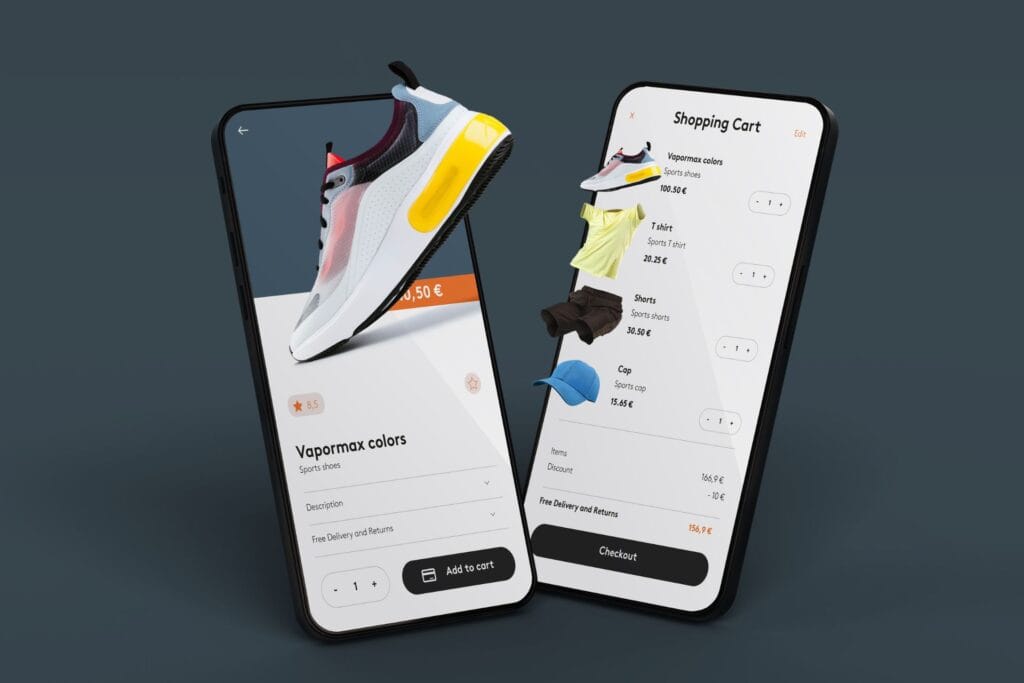
A product page is the digital equivalent of your best salesperson. In the e-commerce environment, a natural disconnect exists: customers cannot physically touch, test, or examine a product before buying. A high-performing product page bridges this gap by delivering precise specifications, seamless functionality, and the exact information required to drive a purchasing decision.
At Venda Technologies, we do not just build digital brochures; we engineer revenue-generating infrastructure. Here is the blueprint for creating product pages that convert traffic into tangible sales.
The Core Functions of a Product Page
A strategically designed product detail page (PDP) must execute three primary tasks:
- Deliver Granular Data: Present comprehensive product specifications, dimensions, materials, and use cases.
- Establish Immediate Trust: Anticipate buyer hesitation and resolve it through transparent policies, clear pricing, and verified social proof.
- Drive the Conversion: Guide the user seamlessly from initial interest to a completed checkout without technical friction.
Step-by-Step Guide to High-Converting Product Pages
1. Execute Technical & On-Page SEO
Your product cannot sell if it cannot be found. Search engines require structured data to understand and rank your inventory.
- Targeted Keyword Integration: Research the exact terms your target market uses. Instead of broad terms like “laptop,” target specific search intent, such as “best gaming laptop under 100K KES.” Integrate these into your URL slug, meta description, and product title.
- Heading Hierarchy (H1 & H2): Use strict H1 tags for the main product title and H2 tags for sub-sections (e.g., “Technical Specifications” or “Customer Reviews”) so search engine crawlers can index the content efficiently.
- Schema Markup (Structured Data): Implement JSON-LD product schema. This backend code feeds Google the exact price, stock status, and SKU, allowing your products to appear as “Rich Results” directly on the search engine results page.
- Core Web Vitals & Load Speed: Speed dictates conversion. A page that loads in one second converts at three times the rate of a page that takes five seconds. Compress assets, utilize caching, and minify code to ensure instant rendering.
2. Deploy High-Fidelity Visual Assets
Visuals are the primary substitute for the physical retail experience.
- Professional Media: Use high-resolution photography showcasing the product from multiple angles. Include lifestyle images that demonstrate the product in active use.
- Interactive Elements: Implement clean zoom functionality. For customizable goods, integrate a product configurator that allows users to instantly visualize different colors, materials, or upgrades.
- Optimized File Delivery: Ensure all image filenames use descriptive keywords (e.g., black-leather-office-chair.webp) and include descriptive alt-text for accessibility and image search indexing.
3. Write Direct, Comprehensive Product Copy
Your layout must present information logically, allowing users to scan for quick facts or read deeply for specific technical details.
- The Description: Break down features into distinct benefits. Include exact dimensions, materials, care instructions, and compatibility data.
- Transparent Pricing: Display the final price clearly. If applicable, explicitly state any shipping fees, taxes, or available promotional discounts to prevent cart abandonment caused by hidden costs.
- Policies & Guarantees: Display your warranty and return policies directly on the page. Transparency reduces buyer anxiety and preemptively answers customer service inquiries.
4. Engineer for Mobile-First Browsing

With the majority of e-commerce traffic originating from smartphones—especially across Nairobi and the wider Kenyan market—mobile responsiveness is not an add-on; it is the baseline.
- Ensure buttons are easily tappable (minimum 44×44 pixels).
- Structure the layout so users do not have to pinch or horizontal-scroll to view product data.
- Keep the “Add to Cart” button sticky or immediately accessible within the first mobile viewport.
5. Leverage Social Proof & Trust Signals
Consumers trust other consumers. Integrating verifiable social proof directly influences purchasing behavior.
- Reviews and Ratings: Embed a native review system that allows previous buyers to leave text and photo feedback.
- Trust Indicators: Display SSL security badges, trusted payment provider logos, and any relevant industry certifications or media features.
6. Automate Cross-Selling and Upselling
Increase your Average Order Value (AOV) by architecting intelligent recommendation engines directly into the page layout.
- Complementary Items: Use a “Frequently Bought Together” section to suggest relevant accessories (e.g., suggesting a specific protective case when a user is viewing a mobile device).
- Tiered Upgrades: Present side-by-side comparison tables showing how the current product stacks up against premium models, guiding users toward higher-tier purchases.
7. Streamline the Payment Gateway
The checkout process must be frictionless. Any distraction or technical error at this stage results in a lost sale.
- Localized Payment Integration: Connect trusted, seamless payment APIs. Ensure customers can check out using the methods they prefer, whether that is card processors like Paystack and Flutterwave, or direct mobile money integrations via the Daraja API.
- Guest Checkout: Always offer a guest checkout option to eliminate the friction of mandatory account creation.
8. Monitor, Analyze, and Iterate
An e-commerce site is never truly “finished.” You must rely on hard data to dictate your next optimizations.
- Connect Google Search Console to monitor organic visibility and indexing errors.
- Use analytics platforms to track your bounce rate, average session duration, and the specific drop-off points in your conversion funnel.
- Run A/B tests on your Call-to-Action (CTA) button colors, phrasing, and placement to continuously improve your conversion metrics.
Also Read